


Desk Organization Systems That Really Work

A desk organization system is more than just a visual detail. It is a functional tool that improves your concentration and boosts your productivity. A well-organized workspace reduces visual clutter and frees up your brain.
Why an organized desk changes your work
A tidy desk is the foundation for focused work. Clutter acts as a constant visual distraction. Your brain has to constantly filter out unimportant stimuli. This costs valuable mental energy that you need for your tasks.

This distraction can lead to unconscious stress and noticeably reduce your productivity. Every item without a fixed place is a potential interruption to your workflow.
The direct benefits of organization
A well-thought-out system offers clear advantages. You quickly access everything you need, save time, and avoid frustration. You no longer have to interrupt your work to search for a pen, a document, or a charging cable.
The benefits of an organized workspace:
- Less cognitive load: A tidy area helps you concentrate on your task.
- Higher efficiency: Less search time means more time for productive work.
- Lower stress level: A clear structure creates a calmer and more controlled working atmosphere.
An organized environment signals control to your brain. This fosters a positive and productive mindset, which is valuable for complex tasks.
More than just productivity
Organization supports not only the mind but also the body. A clear desk allows you to position your keyboard and mouse ergonomically. This is crucial for a healthy posture and prevents tension in the neck and shoulder area.
A well-designed desk organization system helps you to successfully master studying and working at the same time. It eliminates unnecessary stress factors from the outset.
An investment in organization is a direct investment in your performance. This is especially true in a home office, where the boundaries between private and professional spaces often blur. Here you can find out more about how to implement the basic principles for more order on your desk.
The right tools for your tidy workspace
To maintain order permanently, you need suitable tools. Each organization system serves a specific purpose and solves a specific problem. A well-thought-out combination of different desk organization systems creates the basis for a focused workspace.
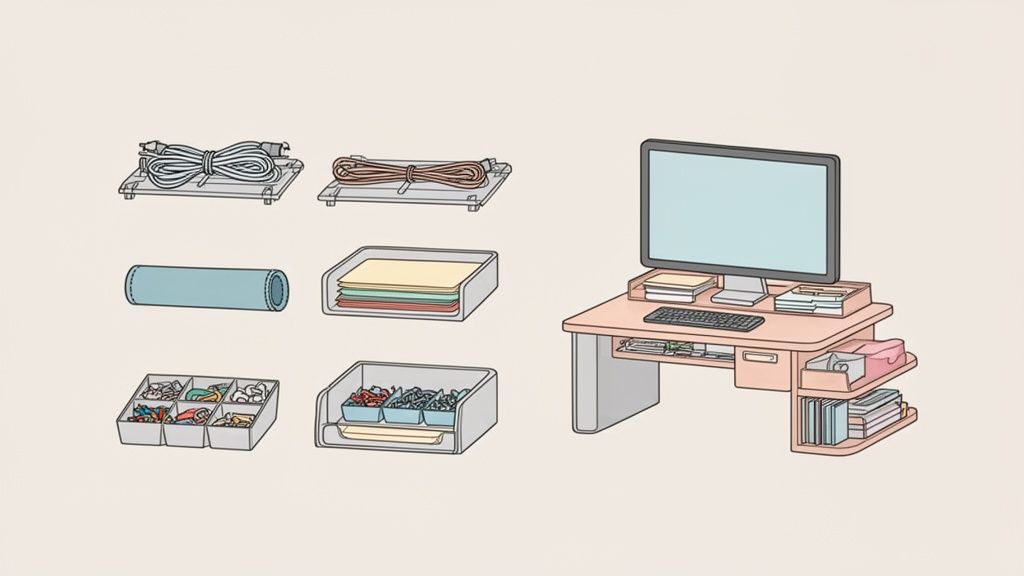
The key is not to buy as many organizers as possible. It's about choosing the right ones and using them specifically for your needs.
Tools for cable management
Cable clutter is one of the biggest distractions at the workplace. It looks messy, makes cleaning difficult, and can be a tripping hazard. Effective cable management is therefore a necessity.
The most important aids for this are:
- Cable trays: They are mounted under the desk surface and hold power supplies, power strips, and excess cables. Everything disappears invisibly and is stored securely.
- Cable sleeves or cable chains: These bundle the cables that run from the desk to the power outlet. This ensures a clean look and protects the cables from damage, especially with height-adjustable desks.
- Cable clips and cable ties: Small helpers to neatly fix individual cables to the desk edge or along the desk legs.
With clean cable routing, you create a calm visual base. If you want to delve deeper into the topic, read our guide to professional cable management at the workplace.
Systems for documents and notes
Even in the digital age, paper is present. Invoices, notes, or important documents need a fixed place so that they don't clutter the workspace.
There are various solutions for this. Letter trays are ideal for sorting papers by priority or topic. Document holders keep important sheets upright in a readable position. For confidential content, lockable drawers or mobile pedestals are the appropriate choice.
A clear filing system reduces the search time for documents to a minimum. You always know where something is and keep track of your tasks.
Organizers for small items
Pens, paper clips, sticky notes, and USB sticks are typical items that quickly cause chaos. Without a fixed place, they wander across the table and are rarely where you look for them.
Small organizers help here. Pen holders, small trays, or drawer inserts group these items and make them immediately accessible. So each item has its place and is at hand when needed.
In hybrid working, where often less than 50% of workstations are occupied at the same time, such systems make a big difference. Good organization can increase personal efficiency by up to 20%. This value becomes more relevant as companies increasingly invest in optimized home office setups.
Multifunctional helpers like monitor stands
A monitor stand is an example of a multifunctional organization system. It performs two tasks simultaneously.
First, it brings your screen to an ergonomically correct height, which relieves strain on your neck and shoulders. Second, it creates storage space directly under the monitor. Many models have integrated drawers or shelves. This is ideal for keyboards, mice, or notebooks.
To make your selection easier, we have summarized the most common systems in a table. This way you can see which tool is suitable for which purpose.
Overview of organization systems by application area
This table compares different types of organization systems, their main function, and ideal use cases.
| System Type | Main Function | Ideal for |
|---|---|---|
| Cable Management | Bundling and hiding cables | Every desk, especially height-adjustable models |
| Document Trays | Sorting and storing paper | Workplaces with regular paper flow |
| Drawer Organizers | Organizing small items (pens, paper clips) | Anyone who needs many small utensils close at hand |
| Monitor Stands | Ergonomics and additional storage space | Users who want to create space under the screen |
| Mobile Pedestals | Mobile storage for folders & documents | Flexible workstations and for sensitive documents |
| Wall Organizers | Space-saving vertical storage | Small desks or minimalist setups |
With this overview, you can more easily find the right helpers for your workspace. A good combination is often the key to success.
How to find the perfect organization system for your desk
The best organization system seamlessly integrates into your daily work routine. There is no standard solution. Your goal is a system that supports your individual processes and does not become a rigid corset.
To find the right desk organization system, you first need to understand your own working style. The first step is an honest assessment: What do you really need and how do you work?
Analyze your working style
Start by asking yourself some basic questions. Your answers are the key to a system that works for you.
- Digital or analog? Do you primarily work on a computer, or are physical documents and notebooks part of your daily routine? If you work a lot with paper, you need well-thought-out filing systems such as letter trays or a mobile pedestal.
- How many devices do you use? A laptop, two monitors, and a tablet require a different setup than a workstation with only one device. The number of your devices determines the need for cable management and footprint.
- What small items need to be at hand? Make a list of all the small things you regularly need. This could be pens, sticky notes, or headphones. These items need a fixed place in an organizer.
A system that doesn't fit your workflow will quickly be ignored and lead back to chaos. Take the time to analyze your needs. This planning prevents bad investments and frustration.
Recommendations for different user types
Based on your analysis, you can probably categorize yourself as one of these user types. Each type benefits from different desk organization systems.
The minimalist power user
You work almost exclusively digitally and prefer a clear workspace. Your setup is reduced to the minimum.
- Focus: Invisible organization.
- Recommendation: A cable tray under the desktop to hide cables. Plus a monitor stand with integrated storage for keyboard and mouse, and a single organizer for pens and sticky notes.
The creative creator
Your workspace is a workshop with various devices such as cameras and microphones. Flexibility and quick access are crucial.
- Focus: Modularity and everything within reach.
- Recommendation: A perforated wall system above the desk for hanging tools and cables. Flexible monitor arms for screens create space. Open shelves and organizers with many compartments are ideal.
The classic office user
For you, the digital and analog worlds mix. Contracts, invoices, and handwritten notes are part of everyday life.
- Focus: Clearly structured filing.
- Recommendation: A multi-tiered letter tray system to sort documents. A mobile pedestal under the desk for folders and confidential documents. A well-sorted drawer insert for office supplies.
Height-adjustable desks and organization systems
A height-adjustable desk enables dynamic working. For this to work smoothly, the organization must be adapted. A well-thought-out desk organization system is a necessity here.
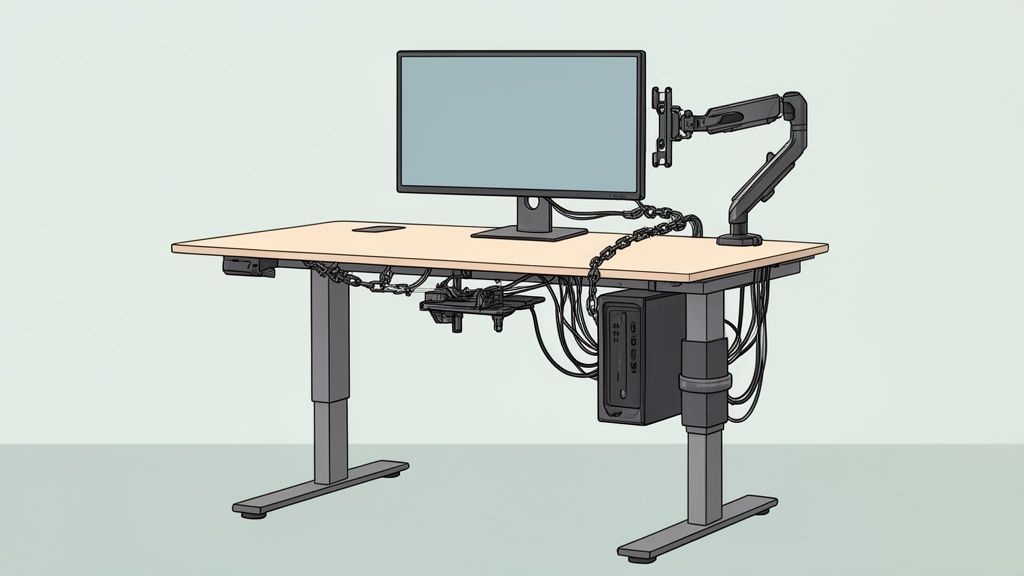
The crucial difference to a rigid desk is movement. Every cable and every device must be attached in such a way that it can accommodate the height adjustment. Otherwise, cable breaks, damaged connections or falling devices are a risk.
The be-all and end-all: Flexible cable management
The heart of a dynamic setup is flexible cable management. Rigid cable ducts are unsuitable. You need solutions that compensate for the length difference between the tabletop and the power outlet.
- Cable chains: They function like a flexible spine. They guide the cables securely from the floor to the underside of the table and prevent anything from getting pinched or pulled taut.
- Stretchable cable sleeves: These covers made of textile or neoprene bundle the cables and give way when moving upwards. This is a clean and inconspicuous solution.
Combine one of these vertical guides with a horizontal cable tray directly under the tabletop. This is where the power strip and power supplies disappear. The result: Only one power cable leads to the floor and moves with the table.
PC holders and monitor arms for an integrated setup
For your workspace to function as a unit, all heavy devices must be attached directly to the table. A PC on the floor creates cable clutter with a sit-stand desk.
The solution is a PC holder that is mounted under the tabletop. The computer moves with the desk. This protects the cables and makes cleaning easier.
Equally important are monitor arms. They create space on the work surface and fix the screens to the top. This maintains ergonomic alignment at any height. Your complete setup moves synchronously. You can concentrate on correctly setting up a height-adjustable desk without having to readjust.
The key is to anchor all components to the tabletop. Only then can you create a dynamic workspace that remains stable, secure, and tidy with every movement.
This approach is reflected in office trends. With the rise of hybrid work models, more people are investing in flexible home office setups. For desks like the DESKSPACE models, which can support up to 200 kg, such integrated desk organization systems are crucial for longevity and functionality. As studies show that 26.3% of companies view their office spaces as underutilized, optimizing the home workspace becomes more important.
Models like the DESKSPACE PRO and TITAN are built for such configurations. Their high load capacity handles setups with multiple monitors, PCs, and other accessories. The integrated anti-collision protection provides additional safety if an obstacle is in the way during adjustment.
Your 5-step plan for a perfectly organized desk
A tidy workspace is the result of a well-thought-out system. With a clear plan, you create a structure that works and doesn't fall back into chaos after a few days. This guide will lead you to your organized desk in five steps.

The key is to approach each step consciously. It's not about a one-time action, but about a functional and sustainable order that supports you in your daily life.
Step 1: Inventory and decluttering
Before you think about new desk organization systems, you need to know what needs to be organized. The first step is necessary: Clear your desk completely.
Pick up each item and ask yourself:
- Do I need this for my daily work?
- Have I used it in the last three months?
- Does it have to be on the desk or is there a better place?
Be consistent. Everything that is broken or superfluous is removed. This process creates physical space and mental clarity.
Step 2: Divide the workspace into zones
Now the area is clear. Divide it mentally into zones. This principle helps you group everything logically and avoid unnecessary movements.
- Primary zone (direct reach): This is where everything you constantly need belongs. Your keyboard, mouse, and a notebook.
- Secondary zone (extended reach): This is where things you use daily, but not constantly, find their place. Your smartphone or headset.
- Tertiary zone (outer area): Everything you rarely need goes to the outside. This could be reference books or spare pens.
Zoning ensures that your most important tools are always at hand. This minimizes distractions and maintains your workflow.
Step 3: The invisible foundation – cable management
Clean cable management is the invisible foundation for order. Take care of it before you set up your devices again.
- Install cable tray: Mount a cable tray under the desk surface. This is where the power strip and power supplies disappear.
- Bundle cables: Use cable sleeves or hook and loop cable ties to bundle cable runs from the tray to your devices.
- Attach vertical guide: For height-adjustable desks, a flexible cable chain or cable sleeve to the floor is indispensable so that nothing gets caught.
Step 4: Strategically place organizers and systems
Now your desk organization systems are positioned. Assign them to the zones you defined in Step 2.
The monitor stand goes in the middle of the primary zone, the pen holder in the secondary, and the document tray at the edge. Each system must serve a fixed purpose.
Step 5: The power of routine – making order a habit
The most important step for lasting order is routine. Take five minutes at the end of each workday to put everything back in its designated place.
This small habit makes a big difference. It prevents chaos from accumulating and ensures that you start every morning at a clean workspace.
The path to a permanently organized desk is a matter of strategy. The following table summarizes the five central steps again.
5-step plan for desk organization
| Step | Action | Concrete Tip |
|---|---|---|
| 1. Declutter | Completely clear the desk and evaluate each item. | Apply the 3-month rule: If you haven't used it for that long, it can go. |
| 2. Zone segmentation | Divide the workspace into primary, secondary, and tertiary areas. | Place keyboard and mouse in the primary zone, everything else within arm's reach. |
| 3. Cable management | Bundle and hide all cables under the desk. | Invest in a cable tray and hook and loop cable ties. |
| 4. Place organizers | Arrange organization systems according to the zones. | Use vertical space with a monitor stand that offers storage space. |
| 5. Establish routine | Make daily 5-minute tidy-up a firm habit. | Set a timer at the end of the workday to solidify the routine. |
If you follow these five steps, you won't just create short-term order. You'll establish a system that allows you to work more productively and focused in the long run.
How order promotes your ergonomics and health
A tidy desk is more than just a matter of aesthetics. It is a building block for your ergonomics and well-being. Order directly influences your physical health, because the connection between the structure of your workspace and your posture is close.
Poorly positioned items or cable clutter can unconsciously force you into an unhealthy posture. If you constantly have to bend over a stack of papers or reach around a monitor, this leads to one-sided strain and tension.
Direct impact on posture
A clear, structured workspace is the basis for correct ergonomic alignment. Only when there is enough space can you position your keyboard and mouse at the correct distance and angle. This relieves your wrists, arms, and shoulders.
Desk organization systems play an active role here:
- Monitor stands raise the screen to eye level. This prevents you from tilting your head and prevents neck pain.
- Document holders position your documents upright next to the screen. This way you avoid constantly turning your head and an unnatural posture.
- Good cable management eliminates tripping hazards and creates freedom of movement for your feet under the table, an important prerequisite for a stable sitting position.
Prevention instead of reaction
Every element with a fixed place helps you maintain your ergonomically optimal position. You don't have to adjust your posture to the chaos. The system supports you in working healthily. A well-organized and ergonomic work environment is also important in a professional context. If you want to delve deeper into the topic, you can find out what support specialized practice software for occupational therapy can offer.
Well-thought-out organization is a proactive measure for health care. It helps to avoid chronic ailments such as back pain or RSI syndrome (Repetitive Strain Injury).
As Germany remains a home office stronghold, ergonomic workplaces at home are crucial. Poor ergonomics can lead to back pain, which, according to reports, accounts for up to 30% of sick leave in home offices. A good setup thus becomes a personal advantage.
Frequently asked questions about organization systems
Here are the answers to the most common questions about desk organization.
How do I best start organizing?
The most effective way is to start fresh. Clear your desk completely. Pick up each item and ask yourself, "Do I really need this at my workspace?" This creates a clean foundation before you install new organization systems.
Which system is indispensable for a height-adjustable desk?
Well-designed cable management. A cable tray mounted under the desk in combination with a flexible cable sleeve is crucial here. Only then will all cables remain securely in place when the desk moves, without tension and without damage.
How can I keep my desk tidy permanently?
Establish a five-minute routine at the end of each workday. Before you leave for the evening, put everything back in its designated place. This small habit prevents chaos from accumulating over the week.
Is a monitor stand with built-in drawers worthwhile?
Yes, especially with limited desk space. A monitor stand like the DESKSPACE Monitor Stand Pro raises your screen to an ergonomic height and at the same time creates storage space for small items such as sticky notes, pens, or USB sticks.
Are you ready to create the perfect organization for your workspace? Find the right organization systems and ergonomic furniture at DESKSPACE. Discover our extensive range now.


