{"variants":[{"id":47311584723287,"name":null,"title":"None \/ Black \/ Frame Only","option1":"None","option2":"Black","option3":"Frame Only","available":true,"inventory_policy":"continue","inventory_quantity":13,"limited_pre_order":false,"negative_stock_count":null,"price":30900,"compare_at_price":40900,"_karla_estimated_ship_date_start":null,"_karla_estimated_ship_date_end":null,"_container_id":null},{"id":47311584887127,"name":null,"title":"None \/ White \/ Frame Only","option1":"None","option2":"White","option3":"Frame Only","available":true,"inventory_policy":"continue","inventory_quantity":140,"limited_pre_order":false,"negative_stock_count":null,"price":30900,"compare_at_price":40900,"_karla_estimated_ship_date_start":null,"_karla_estimated_ship_date_end":null,"_container_id":null},{"id":50541195592023,"name":null,"title":"None \/ Grey \/ Frame Only","option1":"None","option2":"Grey","option3":"Frame Only","available":true,"inventory_policy":"continue","inventory_quantity":17,"limited_pre_order":false,"negative_stock_count":null,"price":30900,"compare_at_price":40900,"_karla_estimated_ship_date_start":null,"_karla_estimated_ship_date_end":null,"_container_id":null},{"id":40677505171499,"name":null,"title":"Black \/ Black \/ 120 x 60 cm","option1":"Black","option2":"Black","option3":"120 x 60 cm","available":true,"inventory_policy":"continue","inventory_quantity":13,"limited_pre_order":false,"negative_stock_count":null,"price":41900,"compare_at_price":53900,"_karla_estimated_ship_date_start":null,"_karla_estimated_ship_date_end":null,"_container_id":null},{"id":40265028468779,"name":null,"title":"Black \/ Black \/ 140 x 70 cm","option1":"Black","option2":"Black","option3":"140 x 70 cm","available":true,"inventory_policy":"continue","inventory_quantity":13,"limited_pre_order":false,"negative_stock_count":null,"price":48900,"compare_at_price":62900,"_karla_estimated_ship_date_start":null,"_karla_estimated_ship_date_end":null,"_container_id":null},{"id":40265028501547,"name":null,"title":"Black \/ Black \/ 160 x 80 cm","option1":"Black","option2":"Black","option3":"160 x 80 cm","available":true,"inventory_policy":"continue","inventory_quantity":13,"limited_pre_order":false,"negative_stock_count":null,"price":51900,"compare_at_price":67900,"_karla_estimated_ship_date_start":null,"_karla_estimated_ship_date_end":null,"_container_id":null},{"id":47245598064983,"name":null,"title":"Black \/ Black \/ 180 x 80 cm","option1":"Black","option2":"Black","option3":"180 x 80 cm","available":true,"inventory_policy":"continue","inventory_quantity":13,"limited_pre_order":false,"negative_stock_count":null,"price":56900,"compare_at_price":73900,"_karla_estimated_ship_date_start":null,"_karla_estimated_ship_date_end":null,"_container_id":null},{"id":50541195690327,"name":null,"title":"Black \/ Black \/ 200 x 80 cm","option1":"Black","option2":"Black","option3":"200 x 80 cm","available":true,"inventory_policy":"continue","inventory_quantity":13,"limited_pre_order":false,"negative_stock_count":null,"price":57900,"compare_at_price":75900,"_karla_estimated_ship_date_start":null,"_karla_estimated_ship_date_end":null,"_container_id":null},{"id":40677505204267,"name":null,"title":"Black \/ White \/ 120 x 60 cm","option1":"Black","option2":"White","option3":"120 x 60 cm","available":true,"inventory_policy":"continue","inventory_quantity":93,"limited_pre_order":false,"negative_stock_count":null,"price":41900,"compare_at_price":53900,"_karla_estimated_ship_date_start":null,"_karla_estimated_ship_date_end":null,"_container_id":null},{"id":40265028534315,"name":null,"title":"Black \/ White \/ 140 x 70 cm","option1":"Black","option2":"White","option3":"140 x 70 cm","available":true,"inventory_policy":"continue","inventory_quantity":140,"limited_pre_order":false,"negative_stock_count":null,"price":48900,"compare_at_price":62900,"_karla_estimated_ship_date_start":null,"_karla_estimated_ship_date_end":null,"_container_id":null},{"id":40265028567083,"name":null,"title":"Black \/ White \/ 160 x 80 cm","option1":"Black","option2":"White","option3":"160 x 80 cm","available":true,"inventory_policy":"continue","inventory_quantity":118,"limited_pre_order":false,"negative_stock_count":null,"price":51900,"compare_at_price":67900,"_karla_estimated_ship_date_start":null,"_karla_estimated_ship_date_end":null,"_container_id":"ler25019-c2"},{"id":47245598097751,"name":null,"title":"Black \/ White \/ 180 x 80 cm","option1":"Black","option2":"White","option3":"180 x 80 cm","available":true,"inventory_policy":"continue","inventory_quantity":106,"limited_pre_order":false,"negative_stock_count":null,"price":56900,"compare_at_price":73900,"_karla_estimated_ship_date_start":null,"_karla_estimated_ship_date_end":null,"_container_id":null},{"id":50541195723095,"name":null,"title":"Black \/ White \/ 200 x 80 cm","option1":"Black","option2":"White","option3":"200 x 80 cm","available":true,"inventory_policy":"continue","inventory_quantity":49,"limited_pre_order":false,"negative_stock_count":null,"price":57900,"compare_at_price":75900,"_karla_estimated_ship_date_start":null,"_karla_estimated_ship_date_end":null,"_container_id":null},{"id":50541195755863,"name":null,"title":"Black \/ Grey \/ 120 x 60 cm","option1":"Black","option2":"Grey","option3":"120 x 60 cm","available":true,"inventory_policy":"continue","inventory_quantity":17,"limited_pre_order":false,"negative_stock_count":null,"price":41900,"compare_at_price":53900,"_karla_estimated_ship_date_start":null,"_karla_estimated_ship_date_end":null,"_container_id":null},{"id":50541195854167,"name":null,"title":"Black \/ Grey \/ 140 x 70 cm","option1":"Black","option2":"Grey","option3":"140 x 70 cm","available":true,"inventory_policy":"continue","inventory_quantity":17,"limited_pre_order":false,"negative_stock_count":null,"price":48900,"compare_at_price":62900,"_karla_estimated_ship_date_start":null,"_karla_estimated_ship_date_end":null,"_container_id":null},{"id":50541195886935,"name":null,"title":"Black \/ Grey \/ 160 x 80 cm","option1":"Black","option2":"Grey","option3":"160 x 80 cm","available":true,"inventory_policy":"continue","inventory_quantity":17,"limited_pre_order":false,"negative_stock_count":null,"price":51900,"compare_at_price":67900,"_karla_estimated_ship_date_start":null,"_karla_estimated_ship_date_end":null,"_container_id":null},{"id":50541195919703,"name":null,"title":"Black \/ Grey \/ 180 x 80 cm","option1":"Black","option2":"Grey","option3":"180 x 80 cm","available":true,"inventory_policy":"continue","inventory_quantity":17,"limited_pre_order":false,"negative_stock_count":null,"price":56900,"compare_at_price":73900,"_karla_estimated_ship_date_start":null,"_karla_estimated_ship_date_end":null,"_container_id":null},{"id":50541195952471,"name":null,"title":"Black \/ Grey \/ 200 x 80 cm","option1":"Black","option2":"Grey","option3":"200 x 80 cm","available":true,"inventory_policy":"continue","inventory_quantity":17,"limited_pre_order":false,"negative_stock_count":null,"price":57900,"compare_at_price":75900,"_karla_estimated_ship_date_start":null,"_karla_estimated_ship_date_end":null,"_container_id":"ler25019-c2"},{"id":40677505302571,"name":null,"title":"Walnut \/ Black \/ 120 x 60 cm","option1":"Walnut","option2":"Black","option3":"120 x 60 cm","available":true,"inventory_policy":"continue","inventory_quantity":-1,"limited_pre_order":false,"negative_stock_count":null,"price":41900,"compare_at_price":53900,"_karla_estimated_ship_date_start":null,"_karla_estimated_ship_date_end":null,"_container_id":null},{"id":40265028763691,"name":null,"title":"Walnut \/ Black \/ 140 x 70 cm","option1":"Walnut","option2":"Black","option3":"140 x 70 cm","available":true,"inventory_policy":"continue","inventory_quantity":13,"limited_pre_order":false,"negative_stock_count":null,"price":48900,"compare_at_price":62900,"_karla_estimated_ship_date_start":null,"_karla_estimated_ship_date_end":null,"_container_id":null},{"id":40583409401899,"name":null,"title":"Walnut \/ Black \/ 160 x 80 cm","option1":"Walnut","option2":"Black","option3":"160 x 80 cm","available":true,"inventory_policy":"continue","inventory_quantity":13,"limited_pre_order":false,"negative_stock_count":null,"price":51900,"compare_at_price":67900,"_karla_estimated_ship_date_start":null,"_karla_estimated_ship_date_end":null,"_container_id":null},{"id":47245598130519,"name":null,"title":"Walnut \/ Black \/ 180 x 80 cm","option1":"Walnut","option2":"Black","option3":"180 x 80 cm","available":true,"inventory_policy":"continue","inventory_quantity":13,"limited_pre_order":false,"negative_stock_count":null,"price":56900,"compare_at_price":73900,"_karla_estimated_ship_date_start":null,"_karla_estimated_ship_date_end":null,"_container_id":"ler25019-c2"},{"id":50541195985239,"name":null,"title":"Walnut \/ Black \/ 200 x 80 cm","option1":"Walnut","option2":"Black","option3":"200 x 80 cm","available":true,"inventory_policy":"continue","inventory_quantity":13,"limited_pre_order":false,"negative_stock_count":null,"price":57900,"compare_at_price":75900,"_karla_estimated_ship_date_start":null,"_karla_estimated_ship_date_end":null,"_container_id":null},{"id":40677505335339,"name":null,"title":"Walnut \/ White \/ 120 x 60 cm","option1":"Walnut","option2":"White","option3":"120 x 60 cm","available":true,"inventory_policy":"continue","inventory_quantity":-1,"limited_pre_order":false,"negative_stock_count":null,"price":41900,"compare_at_price":53900,"_karla_estimated_ship_date_start":null,"_karla_estimated_ship_date_end":null,"_container_id":null},{"id":40265028829227,"name":null,"title":"Walnut \/ White \/ 140 x 70 cm","option1":"Walnut","option2":"White","option3":"140 x 70 cm","available":true,"inventory_policy":"continue","inventory_quantity":115,"limited_pre_order":false,"negative_stock_count":null,"price":48900,"compare_at_price":62900,"_karla_estimated_ship_date_start":null,"_karla_estimated_ship_date_end":null,"_container_id":null},{"id":40583410122795,"name":null,"title":"Walnut \/ White \/ 160 x 80 cm","option1":"Walnut","option2":"White","option3":"160 x 80 cm","available":true,"inventory_policy":"continue","inventory_quantity":47,"limited_pre_order":false,"negative_stock_count":null,"price":51900,"compare_at_price":67900,"_karla_estimated_ship_date_start":null,"_karla_estimated_ship_date_end":null,"_container_id":null},{"id":47245598163287,"name":null,"title":"Walnut \/ White \/ 180 x 80 cm","option1":"Walnut","option2":"White","option3":"180 x 80 cm","available":true,"inventory_policy":"continue","inventory_quantity":56,"limited_pre_order":false,"negative_stock_count":null,"price":56900,"compare_at_price":73900,"_karla_estimated_ship_date_start":null,"_karla_estimated_ship_date_end":null,"_container_id":"ler25019-c2"},{"id":50541196018007,"name":null,"title":"Walnut \/ White \/ 200 x 80 cm","option1":"Walnut","option2":"White","option3":"200 x 80 cm","available":true,"inventory_policy":"continue","inventory_quantity":37,"limited_pre_order":false,"negative_stock_count":null,"price":57900,"compare_at_price":75900,"_karla_estimated_ship_date_start":null,"_karla_estimated_ship_date_end":null,"_container_id":null},{"id":50541196050775,"name":null,"title":"Walnut \/ Grey \/ 120 x 60 cm","option1":"Walnut","option2":"Grey","option3":"120 x 60 cm","available":true,"inventory_policy":"continue","inventory_quantity":-1,"limited_pre_order":false,"negative_stock_count":null,"price":41900,"compare_at_price":53900,"_karla_estimated_ship_date_start":null,"_karla_estimated_ship_date_end":null,"_container_id":null},{"id":50541196149079,"name":null,"title":"Walnut \/ Grey \/ 140 x 70 cm","option1":"Walnut","option2":"Grey","option3":"140 x 70 cm","available":true,"inventory_policy":"continue","inventory_quantity":17,"limited_pre_order":false,"negative_stock_count":null,"price":48900,"compare_at_price":62900,"_karla_estimated_ship_date_start":null,"_karla_estimated_ship_date_end":null,"_container_id":null},{"id":50541196181847,"name":null,"title":"Walnut \/ Grey \/ 160 x 80 cm","option1":"Walnut","option2":"Grey","option3":"160 x 80 cm","available":true,"inventory_policy":"continue","inventory_quantity":17,"limited_pre_order":false,"negative_stock_count":null,"price":51900,"compare_at_price":67900,"_karla_estimated_ship_date_start":null,"_karla_estimated_ship_date_end":null,"_container_id":null},{"id":50541196214615,"name":null,"title":"Walnut \/ Grey \/ 180 x 80 cm","option1":"Walnut","option2":"Grey","option3":"180 x 80 cm","available":true,"inventory_policy":"continue","inventory_quantity":17,"limited_pre_order":false,"negative_stock_count":null,"price":56900,"compare_at_price":73900,"_karla_estimated_ship_date_start":null,"_karla_estimated_ship_date_end":null,"_container_id":"ler25019-c2"},{"id":50541196312919,"name":null,"title":"Walnut \/ Grey \/ 200 x 80 cm","option1":"Walnut","option2":"Grey","option3":"200 x 80 cm","available":true,"inventory_policy":"continue","inventory_quantity":17,"limited_pre_order":false,"negative_stock_count":null,"price":57900,"compare_at_price":75900,"_karla_estimated_ship_date_start":null,"_karla_estimated_ship_date_end":null,"_container_id":null},{"id":40677505237035,"name":null,"title":"White \/ Black \/ 120 x 60 cm","option1":"White","option2":"Black","option3":"120 x 60 cm","available":true,"inventory_policy":"continue","inventory_quantity":8,"limited_pre_order":false,"negative_stock_count":null,"price":41900,"compare_at_price":53900,"_karla_estimated_ship_date_start":null,"_karla_estimated_ship_date_end":null,"_container_id":null},{"id":40265028599851,"name":null,"title":"White \/ Black \/ 140 x 70 cm","option1":"White","option2":"Black","option3":"140 x 70 cm","available":true,"inventory_policy":"continue","inventory_quantity":13,"limited_pre_order":false,"negative_stock_count":null,"price":48900,"compare_at_price":62900,"_karla_estimated_ship_date_start":null,"_karla_estimated_ship_date_end":null,"_container_id":null},{"id":40265028632619,"name":null,"title":"White \/ Black \/ 160 x 80 cm","option1":"White","option2":"Black","option3":"160 x 80 cm","available":true,"inventory_policy":"continue","inventory_quantity":12,"limited_pre_order":false,"negative_stock_count":null,"price":51900,"compare_at_price":67900,"_karla_estimated_ship_date_start":null,"_karla_estimated_ship_date_end":null,"_container_id":null},{"id":47245598196055,"name":null,"title":"White \/ Black \/ 180 x 80 cm","option1":"White","option2":"Black","option3":"180 x 80 cm","available":true,"inventory_policy":"continue","inventory_quantity":13,"limited_pre_order":false,"negative_stock_count":null,"price":56900,"compare_at_price":73900,"_karla_estimated_ship_date_start":null,"_karla_estimated_ship_date_end":null,"_container_id":null},{"id":50541196345687,"name":null,"title":"White \/ Black \/ 200 x 80 cm","option1":"White","option2":"Black","option3":"200 x 80 cm","available":true,"inventory_policy":"continue","inventory_quantity":13,"limited_pre_order":false,"negative_stock_count":null,"price":57900,"compare_at_price":75900,"_karla_estimated_ship_date_start":null,"_karla_estimated_ship_date_end":null,"_container_id":null},{"id":40677505269803,"name":null,"title":"White \/ White \/ 120 x 60 cm","option1":"White","option2":"White","option3":"120 x 60 cm","available":true,"inventory_policy":"continue","inventory_quantity":8,"limited_pre_order":false,"negative_stock_count":null,"price":41900,"compare_at_price":53900,"_karla_estimated_ship_date_start":null,"_karla_estimated_ship_date_end":null,"_container_id":null},{"id":40265028665387,"name":null,"title":"White \/ White \/ 140 x 70 cm","option1":"White","option2":"White","option3":"140 x 70 cm","available":true,"inventory_policy":"continue","inventory_quantity":60,"limited_pre_order":false,"negative_stock_count":null,"price":48900,"compare_at_price":62900,"_karla_estimated_ship_date_start":null,"_karla_estimated_ship_date_end":null,"_container_id":null},{"id":40265028730923,"name":null,"title":"White \/ White \/ 160 x 80 cm","option1":"White","option2":"White","option3":"160 x 80 cm","available":true,"inventory_policy":"continue","inventory_quantity":12,"limited_pre_order":false,"negative_stock_count":null,"price":51900,"compare_at_price":67900,"_karla_estimated_ship_date_start":null,"_karla_estimated_ship_date_end":null,"_container_id":null},{"id":47245598228823,"name":null,"title":"White \/ White \/ 180 x 80 cm","option1":"White","option2":"White","option3":"180 x 80 cm","available":true,"inventory_policy":"continue","inventory_quantity":88,"limited_pre_order":false,"negative_stock_count":null,"price":56900,"compare_at_price":73900,"_karla_estimated_ship_date_start":null,"_karla_estimated_ship_date_end":null,"_container_id":null},{"id":50541196378455,"name":null,"title":"White \/ White \/ 200 x 80 cm","option1":"White","option2":"White","option3":"200 x 80 cm","available":true,"inventory_policy":"continue","inventory_quantity":42,"limited_pre_order":false,"negative_stock_count":null,"price":57900,"compare_at_price":75900,"_karla_estimated_ship_date_start":null,"_karla_estimated_ship_date_end":null,"_container_id":null},{"id":50541196411223,"name":null,"title":"White \/ Grey \/ 120 x 60 cm","option1":"White","option2":"Grey","option3":"120 x 60 cm","available":true,"inventory_policy":"continue","inventory_quantity":8,"limited_pre_order":false,"negative_stock_count":null,"price":41900,"compare_at_price":53900,"_karla_estimated_ship_date_start":null,"_karla_estimated_ship_date_end":null,"_container_id":null},{"id":50541196443991,"name":null,"title":"White \/ Grey \/ 140 x 70 cm","option1":"White","option2":"Grey","option3":"140 x 70 cm","available":true,"inventory_policy":"continue","inventory_quantity":17,"limited_pre_order":false,"negative_stock_count":null,"price":48900,"compare_at_price":62900,"_karla_estimated_ship_date_start":null,"_karla_estimated_ship_date_end":null,"_container_id":null},{"id":50541196476759,"name":null,"title":"White \/ Grey \/ 160 x 80 cm","option1":"White","option2":"Grey","option3":"160 x 80 cm","available":true,"inventory_policy":"continue","inventory_quantity":12,"limited_pre_order":false,"negative_stock_count":null,"price":51900,"compare_at_price":67900,"_karla_estimated_ship_date_start":null,"_karla_estimated_ship_date_end":null,"_container_id":"ler25019-c2"},{"id":50541196509527,"name":null,"title":"White \/ Grey \/ 180 x 80 cm","option1":"White","option2":"Grey","option3":"180 x 80 cm","available":true,"inventory_policy":"continue","inventory_quantity":17,"limited_pre_order":false,"negative_stock_count":null,"price":56900,"compare_at_price":73900,"_karla_estimated_ship_date_start":null,"_karla_estimated_ship_date_end":null,"_container_id":null},{"id":50541196542295,"name":null,"title":"White \/ Grey \/ 200 x 80 cm","option1":"White","option2":"Grey","option3":"200 x 80 cm","available":true,"inventory_policy":"continue","inventory_quantity":17,"limited_pre_order":false,"negative_stock_count":null,"price":57900,"compare_at_price":75900,"_karla_estimated_ship_date_start":null,"_karla_estimated_ship_date_end":null,"_container_id":null}]}
{"variants":[{"id":47311370420567,"name":null,"title":"None \/ Black \/ Frame Only","option1":"None","option2":"Black","option3":"Frame Only","available":true,"inventory_policy":"continue","inventory_quantity":-25,"limited_pre_order":false,"negative_stock_count":null,"price":23900,"compare_at_price":31900,"_karla_estimated_ship_date_start":null,"_karla_estimated_ship_date_end":null,"_container_id":null},{"id":50541119537495,"name":null,"title":"None \/ White \/ Frame Only","option1":"None","option2":"White","option3":"Frame Only","available":true,"inventory_policy":"continue","inventory_quantity":3,"limited_pre_order":false,"negative_stock_count":null,"price":23900,"compare_at_price":31900,"_karla_estimated_ship_date_start":null,"_karla_estimated_ship_date_end":null,"_container_id":null},{"id":50541119570263,"name":null,"title":"None \/ Grey \/ Frame Only","option1":"None","option2":"Grey","option3":"Frame Only","available":true,"inventory_policy":"continue","inventory_quantity":43,"limited_pre_order":false,"negative_stock_count":null,"price":23900,"compare_at_price":31900,"_karla_estimated_ship_date_start":null,"_karla_estimated_ship_date_end":null,"_container_id":null},{"id":50541119603031,"name":null,"title":"Black \/ Black \/ 120 x 60 cm","option1":"Black","option2":"Black","option3":"120 x 60 cm","available":true,"inventory_policy":"continue","inventory_quantity":-25,"limited_pre_order":false,"negative_stock_count":null,"price":34900,"compare_at_price":44900,"_karla_estimated_ship_date_start":null,"_karla_estimated_ship_date_end":null,"_container_id":null},{"id":50541119635799,"name":null,"title":"Black \/ Black \/ 140 x 70 cm","option1":"Black","option2":"Black","option3":"140 x 70 cm","available":true,"inventory_policy":"continue","inventory_quantity":-25,"limited_pre_order":false,"negative_stock_count":null,"price":41900,"compare_at_price":51900,"_karla_estimated_ship_date_start":null,"_karla_estimated_ship_date_end":null,"_container_id":null},{"id":50541119668567,"name":null,"title":"Black \/ Black \/ 160 x 80 cm","option1":"Black","option2":"Black","option3":"160 x 80 cm","available":true,"inventory_policy":"continue","inventory_quantity":-25,"limited_pre_order":false,"negative_stock_count":null,"price":44900,"compare_at_price":54900,"_karla_estimated_ship_date_start":null,"_karla_estimated_ship_date_end":null,"_container_id":null},{"id":52162633171287,"name":null,"title":"Black \/ Black \/ 180 x 80 cm","option1":"Black","option2":"Black","option3":"180 x 80 cm","available":true,"inventory_policy":"continue","inventory_quantity":-25,"limited_pre_order":false,"negative_stock_count":null,"price":49900,"compare_at_price":59900,"_karla_estimated_ship_date_start":null,"_karla_estimated_ship_date_end":null,"_container_id":null},{"id":50541119701335,"name":null,"title":"Black \/ White \/ 120 x 60 cm","option1":"Black","option2":"White","option3":"120 x 60 cm","available":true,"inventory_policy":"continue","inventory_quantity":3,"limited_pre_order":false,"negative_stock_count":null,"price":34900,"compare_at_price":44900,"_karla_estimated_ship_date_start":null,"_karla_estimated_ship_date_end":null,"_container_id":null},{"id":50541119734103,"name":null,"title":"Black \/ White \/ 140 x 70 cm","option1":"Black","option2":"White","option3":"140 x 70 cm","available":true,"inventory_policy":"continue","inventory_quantity":3,"limited_pre_order":false,"negative_stock_count":null,"price":41900,"compare_at_price":51900,"_karla_estimated_ship_date_start":null,"_karla_estimated_ship_date_end":null,"_container_id":null},{"id":50541119766871,"name":null,"title":"Black \/ White \/ 160 x 80 cm","option1":"Black","option2":"White","option3":"160 x 80 cm","available":true,"inventory_policy":"continue","inventory_quantity":3,"limited_pre_order":false,"negative_stock_count":null,"price":44900,"compare_at_price":54900,"_karla_estimated_ship_date_start":null,"_karla_estimated_ship_date_end":null,"_container_id":null},{"id":52162633204055,"name":null,"title":"Black \/ White \/ 180 x 80 cm","option1":"Black","option2":"White","option3":"180 x 80 cm","available":true,"inventory_policy":"continue","inventory_quantity":3,"limited_pre_order":false,"negative_stock_count":null,"price":49900,"compare_at_price":59900,"_karla_estimated_ship_date_start":null,"_karla_estimated_ship_date_end":null,"_container_id":null},{"id":50541119799639,"name":null,"title":"Black \/ Grey \/ 120 x 60 cm","option1":"Black","option2":"Grey","option3":"120 x 60 cm","available":true,"inventory_policy":"continue","inventory_quantity":43,"limited_pre_order":false,"negative_stock_count":null,"price":34900,"compare_at_price":44900,"_karla_estimated_ship_date_start":null,"_karla_estimated_ship_date_end":null,"_container_id":null},{"id":50541119832407,"name":null,"title":"Black \/ Grey \/ 140 x 70 cm","option1":"Black","option2":"Grey","option3":"140 x 70 cm","available":true,"inventory_policy":"continue","inventory_quantity":43,"limited_pre_order":false,"negative_stock_count":null,"price":41900,"compare_at_price":51900,"_karla_estimated_ship_date_start":null,"_karla_estimated_ship_date_end":null,"_container_id":null},{"id":50541119865175,"name":null,"title":"Black \/ Grey \/ 160 x 80 cm","option1":"Black","option2":"Grey","option3":"160 x 80 cm","available":true,"inventory_policy":"continue","inventory_quantity":43,"limited_pre_order":false,"negative_stock_count":null,"price":44900,"compare_at_price":54900,"_karla_estimated_ship_date_start":null,"_karla_estimated_ship_date_end":null,"_container_id":null},{"id":52162633236823,"name":null,"title":"Black \/ Grey \/ 180 x 80 cm","option1":"Black","option2":"Grey","option3":"180 x 80 cm","available":true,"inventory_policy":"continue","inventory_quantity":43,"limited_pre_order":false,"negative_stock_count":null,"price":49900,"compare_at_price":59900,"_karla_estimated_ship_date_start":null,"_karla_estimated_ship_date_end":null,"_container_id":null},{"id":50541119897943,"name":null,"title":"White \/ Black \/ 120 x 60 cm","option1":"White","option2":"Black","option3":"120 x 60 cm","available":true,"inventory_policy":"continue","inventory_quantity":-25,"limited_pre_order":false,"negative_stock_count":null,"price":34900,"compare_at_price":44900,"_karla_estimated_ship_date_start":null,"_karla_estimated_ship_date_end":null,"_container_id":null},{"id":50541119930711,"name":null,"title":"White \/ Black \/ 140 x 70 cm","option1":"White","option2":"Black","option3":"140 x 70 cm","available":true,"inventory_policy":"continue","inventory_quantity":-25,"limited_pre_order":false,"negative_stock_count":null,"price":41900,"compare_at_price":51900,"_karla_estimated_ship_date_start":null,"_karla_estimated_ship_date_end":null,"_container_id":null},{"id":50541119963479,"name":null,"title":"White \/ Black \/ 160 x 80 cm","option1":"White","option2":"Black","option3":"160 x 80 cm","available":true,"inventory_policy":"continue","inventory_quantity":-25,"limited_pre_order":false,"negative_stock_count":null,"price":44900,"compare_at_price":54900,"_karla_estimated_ship_date_start":null,"_karla_estimated_ship_date_end":null,"_container_id":null},{"id":52162633269591,"name":null,"title":"White \/ Black \/ 180 x 80 cm","option1":"White","option2":"Black","option3":"180 x 80 cm","available":true,"inventory_policy":"continue","inventory_quantity":-25,"limited_pre_order":false,"negative_stock_count":null,"price":49900,"compare_at_price":59900,"_karla_estimated_ship_date_start":null,"_karla_estimated_ship_date_end":null,"_container_id":null},{"id":50541119996247,"name":null,"title":"White \/ White \/ 120 x 60 cm","option1":"White","option2":"White","option3":"120 x 60 cm","available":true,"inventory_policy":"continue","inventory_quantity":3,"limited_pre_order":false,"negative_stock_count":null,"price":34900,"compare_at_price":44900,"_karla_estimated_ship_date_start":null,"_karla_estimated_ship_date_end":null,"_container_id":null},{"id":50541120029015,"name":null,"title":"White \/ White \/ 140 x 70 cm","option1":"White","option2":"White","option3":"140 x 70 cm","available":true,"inventory_policy":"continue","inventory_quantity":3,"limited_pre_order":false,"negative_stock_count":null,"price":41900,"compare_at_price":51900,"_karla_estimated_ship_date_start":null,"_karla_estimated_ship_date_end":null,"_container_id":null},{"id":50541120061783,"name":null,"title":"White \/ White \/ 160 x 80 cm","option1":"White","option2":"White","option3":"160 x 80 cm","available":true,"inventory_policy":"continue","inventory_quantity":3,"limited_pre_order":false,"negative_stock_count":null,"price":44900,"compare_at_price":54900,"_karla_estimated_ship_date_start":null,"_karla_estimated_ship_date_end":null,"_container_id":null},{"id":52162633302359,"name":null,"title":"White \/ White \/ 180 x 80 cm","option1":"White","option2":"White","option3":"180 x 80 cm","available":true,"inventory_policy":"continue","inventory_quantity":3,"limited_pre_order":false,"negative_stock_count":null,"price":49900,"compare_at_price":59900,"_karla_estimated_ship_date_start":null,"_karla_estimated_ship_date_end":null,"_container_id":null},{"id":50541120094551,"name":null,"title":"White \/ Grey \/ 120 x 60 cm","option1":"White","option2":"Grey","option3":"120 x 60 cm","available":true,"inventory_policy":"continue","inventory_quantity":8,"limited_pre_order":false,"negative_stock_count":null,"price":34900,"compare_at_price":44900,"_karla_estimated_ship_date_start":null,"_karla_estimated_ship_date_end":null,"_container_id":null},{"id":50541120127319,"name":null,"title":"White \/ Grey \/ 140 x 70 cm","option1":"White","option2":"Grey","option3":"140 x 70 cm","available":true,"inventory_policy":"continue","inventory_quantity":43,"limited_pre_order":false,"negative_stock_count":null,"price":41900,"compare_at_price":51900,"_karla_estimated_ship_date_start":null,"_karla_estimated_ship_date_end":null,"_container_id":null},{"id":50541120160087,"name":null,"title":"White \/ Grey \/ 160 x 80 cm","option1":"White","option2":"Grey","option3":"160 x 80 cm","available":true,"inventory_policy":"continue","inventory_quantity":12,"limited_pre_order":false,"negative_stock_count":null,"price":44900,"compare_at_price":54900,"_karla_estimated_ship_date_start":null,"_karla_estimated_ship_date_end":null,"_container_id":"ler25019-c2"},{"id":52162633335127,"name":null,"title":"White \/ Grey \/ 180 x 80 cm","option1":"White","option2":"Grey","option3":"180 x 80 cm","available":true,"inventory_policy":"continue","inventory_quantity":43,"limited_pre_order":false,"negative_stock_count":null,"price":49900,"compare_at_price":59900,"_karla_estimated_ship_date_start":null,"_karla_estimated_ship_date_end":null,"_container_id":null},{"id":50541120192855,"name":null,"title":"Walnut \/ Black \/ 120 x 60 cm","option1":"Walnut","option2":"Black","option3":"120 x 60 cm","available":true,"inventory_policy":"continue","inventory_quantity":-25,"limited_pre_order":false,"negative_stock_count":null,"price":34900,"compare_at_price":44900,"_karla_estimated_ship_date_start":null,"_karla_estimated_ship_date_end":null,"_container_id":null},{"id":50541120225623,"name":null,"title":"Walnut \/ Black \/ 140 x 70 cm","option1":"Walnut","option2":"Black","option3":"140 x 70 cm","available":true,"inventory_policy":"continue","inventory_quantity":-25,"limited_pre_order":false,"negative_stock_count":null,"price":41900,"compare_at_price":51900,"_karla_estimated_ship_date_start":null,"_karla_estimated_ship_date_end":null,"_container_id":null},{"id":50541120258391,"name":null,"title":"Walnut \/ Black \/ 160 x 80 cm","option1":"Walnut","option2":"Black","option3":"160 x 80 cm","available":true,"inventory_policy":"continue","inventory_quantity":-25,"limited_pre_order":false,"negative_stock_count":null,"price":44900,"compare_at_price":54900,"_karla_estimated_ship_date_start":null,"_karla_estimated_ship_date_end":null,"_container_id":null},{"id":52162633367895,"name":null,"title":"Walnut \/ Black \/ 180 x 80 cm","option1":"Walnut","option2":"Black","option3":"180 x 80 cm","available":true,"inventory_policy":"continue","inventory_quantity":-25,"limited_pre_order":false,"negative_stock_count":null,"price":49900,"compare_at_price":59900,"_karla_estimated_ship_date_start":null,"_karla_estimated_ship_date_end":null,"_container_id":"25019-c2"},{"id":50541120291159,"name":null,"title":"Walnut \/ White \/ 120 x 60 cm","option1":"Walnut","option2":"White","option3":"120 x 60 cm","available":true,"inventory_policy":"continue","inventory_quantity":-1,"limited_pre_order":false,"negative_stock_count":null,"price":34900,"compare_at_price":44900,"_karla_estimated_ship_date_start":null,"_karla_estimated_ship_date_end":null,"_container_id":null},{"id":50541120323927,"name":null,"title":"Walnut \/ White \/ 140 x 70 cm","option1":"Walnut","option2":"White","option3":"140 x 70 cm","available":true,"inventory_policy":"continue","inventory_quantity":3,"limited_pre_order":false,"negative_stock_count":null,"price":41900,"compare_at_price":51900,"_karla_estimated_ship_date_start":null,"_karla_estimated_ship_date_end":null,"_container_id":null},{"id":50541120356695,"name":null,"title":"Walnut \/ White \/ 160 x 80 cm","option1":"Walnut","option2":"White","option3":"160 x 80 cm","available":true,"inventory_policy":"continue","inventory_quantity":3,"limited_pre_order":false,"negative_stock_count":null,"price":44900,"compare_at_price":54900,"_karla_estimated_ship_date_start":null,"_karla_estimated_ship_date_end":null,"_container_id":null},{"id":52162633400663,"name":null,"title":"Walnut \/ White \/ 180 x 80 cm","option1":"Walnut","option2":"White","option3":"180 x 80 cm","available":true,"inventory_policy":"continue","inventory_quantity":3,"limited_pre_order":false,"negative_stock_count":null,"price":49900,"compare_at_price":59900,"_karla_estimated_ship_date_start":null,"_karla_estimated_ship_date_end":null,"_container_id":"learn25019-c2"},{"id":50541120389463,"name":null,"title":"Walnut \/ Grey \/ 120 x 60 cm","option1":"Walnut","option2":"Grey","option3":"120 x 60 cm","available":true,"inventory_policy":"continue","inventory_quantity":-1,"limited_pre_order":false,"negative_stock_count":null,"price":34900,"compare_at_price":44900,"_karla_estimated_ship_date_start":null,"_karla_estimated_ship_date_end":null,"_container_id":null},{"id":50541120422231,"name":null,"title":"Walnut \/ Grey \/ 140 x 70 cm","option1":"Walnut","option2":"Grey","option3":"140 x 70 cm","available":true,"inventory_policy":"continue","inventory_quantity":43,"limited_pre_order":false,"negative_stock_count":null,"price":41900,"compare_at_price":51900,"_karla_estimated_ship_date_start":null,"_karla_estimated_ship_date_end":null,"_container_id":null},{"id":50541120454999,"name":null,"title":"Walnut \/ Grey \/ 160 x 80 cm","option1":"Walnut","option2":"Grey","option3":"160 x 80 cm","available":true,"inventory_policy":"continue","inventory_quantity":43,"limited_pre_order":false,"negative_stock_count":null,"price":44900,"compare_at_price":54900,"_karla_estimated_ship_date_start":null,"_karla_estimated_ship_date_end":null,"_container_id":null},{"id":52162633433431,"name":null,"title":"Walnut \/ Grey \/ 180 x 80 cm","option1":"Walnut","option2":"Grey","option3":"180 x 80 cm","available":true,"inventory_policy":"continue","inventory_quantity":43,"limited_pre_order":false,"negative_stock_count":null,"price":49900,"compare_at_price":59900,"_karla_estimated_ship_date_start":null,"_karla_estimated_ship_date_end":null,"_container_id":"ler25019-c2"}]}
Standing Desks: The Complete Guide to Your Workspace
A sit-stand desk is a height-adjustable workstation. It allows you to quickly switch between sitting and standing. The main benefit is to avoid the negative consequences of prolonged sitting and promote a dynamic way of working. You'll feel the results directly: less back pain, better concentration, and often more tasks completed by the end of the day.
Why switching between sitting and standing is crucial
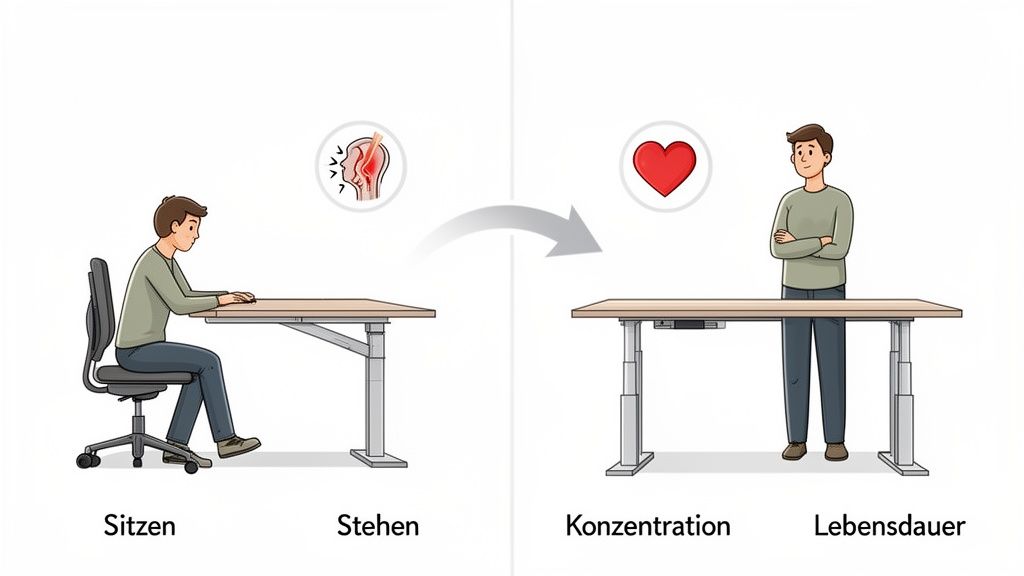
Sitting all day puts one-sided strain on your body. Your core muscles weaken, your intervertebral discs are compressed, and your metabolism slows down. The consequences are well-known: neck tension, lower back pain, and dwindling concentration in the afternoon. A sit-stand desk breaks this cycle.
Regular changes in posture activate your muscles, stimulate circulation, and relieve pressure on your spine. You're not only more physically active, but you also supply your brain with more oxygen. This provides a direct boost to your mental performance.
A dynamic workspace isn't just about comfort. It's the foundation for long-term health and consistent productivity. Changing posture prevents fatigue and keeps your mind clear.
The facts behind dynamic working
Statistics on prolonged sitting are clear. People in Germany spend an average of 9.2 hours per day sitting. A long-term study showed that men who sit for more than six hours a day have up to a 48% increased risk of death. Poor posture is also a major cost factor. Back problems cost German companies around 35 million euros annually.
The use of sit-stand desks brings measurable benefits:
Less back pain: You relieve your lumbar spine and challenge your supportive muscles. This can alleviate existing complaints and prevent new ones.
Better concentration: Improved blood circulation provides your brain with optimal supply. This helps you stay focused during long or difficult tasks.
Higher calorie consumption: The body burns more energy when standing. This adds up throughout the day and supports an active lifestyle.
Improved posture: The constant change motivates you to consciously correct your posture repeatedly and prevents slouching.
How to correctly implement the change in everyday life
The key to success is rhythm. It's about regular changes, not standing for hours. A good rule of thumb is to work standing for about 15 to 20 minutes per hour.
Tasks like phone calls, answering emails, or brief consultations are well suited for standing phases. For phases of highly concentrated work, sitting is often the better choice. In our article, you can learn more about whether working while standing is really as good as everyone says.
Investing in a sit-stand desk is a decision for your health and performance. You create a work environment where you can unleash your full potential without neglecting your body.
The technology behind modern sit-stand desks
A modern sit-stand desk is more than just a desk frame with a motor. It is a precise system. Each component determines stability, longevity, and ease of use. The technology determines how reliable and comfortable your workplace feels in everyday life.
The most important technical decision is the choice of drive system. There are fundamental differences here that directly affect performance and user experience.
Single-Motor vs. Dual-Motor Systems
The number of motors is the heart of your desk. It influences speed, noise level, and load capacity.
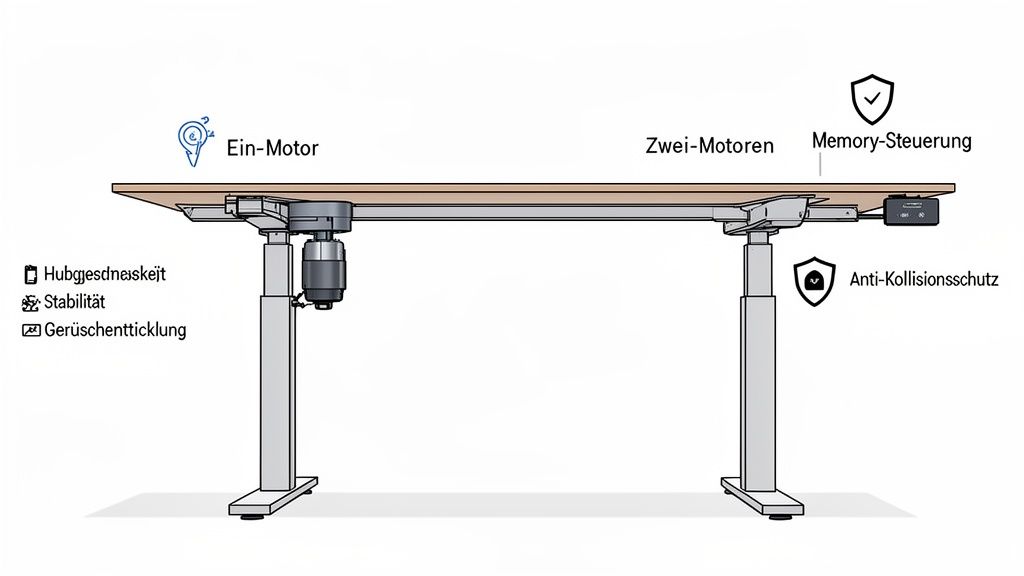
Single-motor systems: A central motor drives both desk legs via a mechanical shaft. They are often cheaper but have disadvantages. Power transmission is indirect, which can lead to slower lifting speeds and louder noises.
Dual-motor systems: A separate motor is integrated into each desk leg. This direct power distribution ensures noticeably faster and quieter height adjustment. It allows for higher load capacity and better stability because the load is distributed evenly. For setups with multiple monitors, they are now the standard.
A dual-motor system is comparable to an all-wheel drive. It offers more power, better control, and higher reliability. Deskspace therefore consistently relies on dual-motor solutions. You can find more technical details in our guide on electrically height-adjustable desk frames.
Choosing a dual-motor system is an investment in longevity and comfort. The smoother, faster, and quieter movement makes daily changes seamless.
Load capacity determines stability and safety
The load capacity indicates how much weight the desk frame can safely lift and hold. A high load capacity is a crucial quality feature for demanding workplaces.
A typical setup with two monitors, a laptop, and accessories quickly weighs 20 kg to 30 kg. A heavy gaming PC or professional audio equipment can double this weight.
A high load capacity of up to 200 kg, as offered by our TITAN models, gives you two assurances:
Safety: You don't have to worry about the motors failing under the load.
Stability: A frame designed for high loads remains wobble-free even when fully loaded and in the highest position.
Intelligent control for maximum comfort
Modern sit-stand desks offer more than just arrow keys. Intelligent controls make daily use efficient and pleasant.
Function
Description
Everyday Benefit
Memory function
Stores up to four individual height positions.
You can instantly return to your perfect sitting and standing height with the press of a button, without having to readjust.
Anti-collision protection
Sensors detect resistance and stop movement immediately.
Protects your furniture and equipment from damage.
Soft start & soft stop
The motor starts and stops movement gently, not abruptly.
Prevents items on the desk from wobbling or falling over.
These functions are essential aids for a smooth workflow. They ensure that you perform posture changes regularly and easily. The combination of a strong drive, high load capacity, and smart control makes for a very good sit-stand desk.
Choosing the right desk top: material, size, and design
The desk top is the heart of your desk. It shapes the look, determines the feel during use, and influences longevity. Choosing the right material and size is crucial to ensure your sit-stand desk fits perfectly into your workspace.
A good desk top must withstand daily stress, be easy to clean, and look good. Each material has its own strengths.
Solid wood, bamboo, and MDF in comparison
The choice of material influences aesthetics, robustness, and maintenance effort. Three materials have established themselves as favorites.
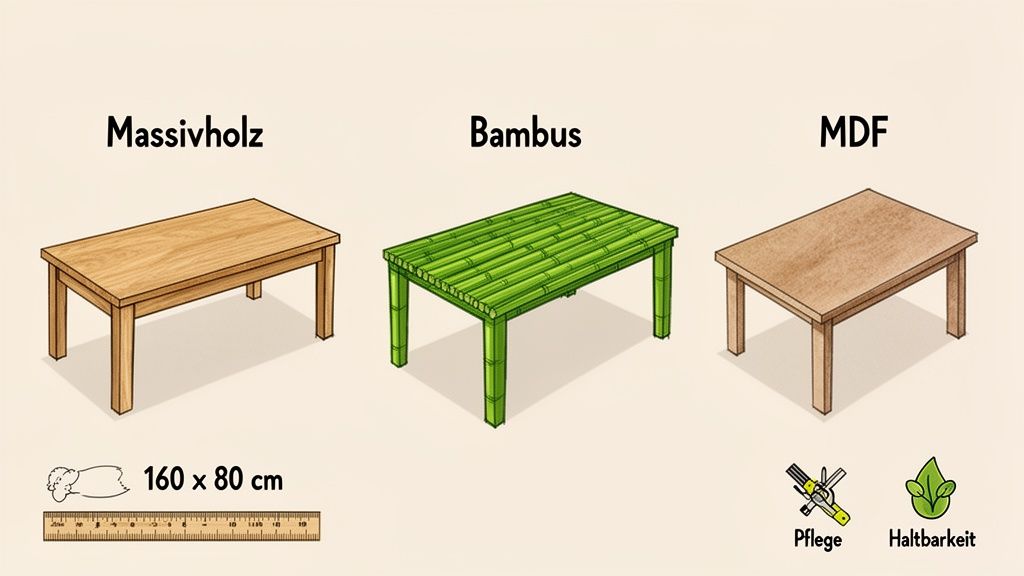
Solid wood: Desk tops made of oak or acacia have strong character. They bring natural warmth to your workspace. Thanks to the unique grain, each top is one-of-a-kind. Solid wood is also extremely durable. If damaged, it can be sanded down and re-oiled.
Bamboo: As a fast-growing raw material, bamboo is a sustainable alternative. The material is hard and resistant, yet lighter than many solid woods. With its bright appearance, bamboo fits well into minimalist setups.
MDF with melamine resin coating: This is a pragmatic and robust solution. Medium-density fiberboards (MDF) with this coating are very easy to clean, insensitive to scratches or liquids, and available in many colors. Their resistance makes them an ideal choice for intensive daily use.
The growing demand for ergonomic workstations is reflected in the figures. The German desk market is projected to grow to 445.32 million euros by 2030. Already, around 45% of working professionals are demanding ergonomic furniture for their home offices. You can find more information on this in the market analyses at Statista.
Your desk top is the place where you work, think, and create. Choose a material that feels good and supports your daily life.
Finding the right size for your workspace
The size of your desk top determines whether you can work relaxed or constantly struggle with lack of space. A top that is too small quickly leads to clutter.
A top size of 160 x 80 cm is considered an ergonomic standard. Here you have enough space for two monitors, keyboard, and mouse. There is free space for notes, and you can comfortably rest your arms.
Depending on the setup, there are different ideal sizes:
Compact setups (e.g., 120 x 60 cm): Suitable for small home office corners or if you primarily work with a laptop.
Standard workstations (e.g., 160 x 80 cm): The best choice for most users who work with one or two monitors.
Generous setups (e.g., 200 x 80 cm): Ideal for creatives or anyone who needs a lot of space for multiple monitors and devices.
The right desk top is a personal decision. If you want to delve deeper into the topic, you can find more information in our guide on choosing the right solid wood desk top. Take your time to weigh the options. You are creating the basis for a productive workspace.
Setting up your workstation for perfect ergonomics
A height-adjustable desk is the foundation for an ergonomic workstation. It only unfolds its full effect when you adjust it to your body measurements. An incorrect height can negate the benefits and lead to new tension.
The goal is a neutral and relaxed body posture while sitting and standing. You achieve this by following a few simple rules.
Finding the optimal sitting height
Always start with your office chair. Adjust it so that your feet are flat on the floor and your knees form an angle of approximately 90 degrees. Only then adjust the desk.
You can find the correct desk height for sitting as follows:
Sit upright but relaxed and relax your shoulders.
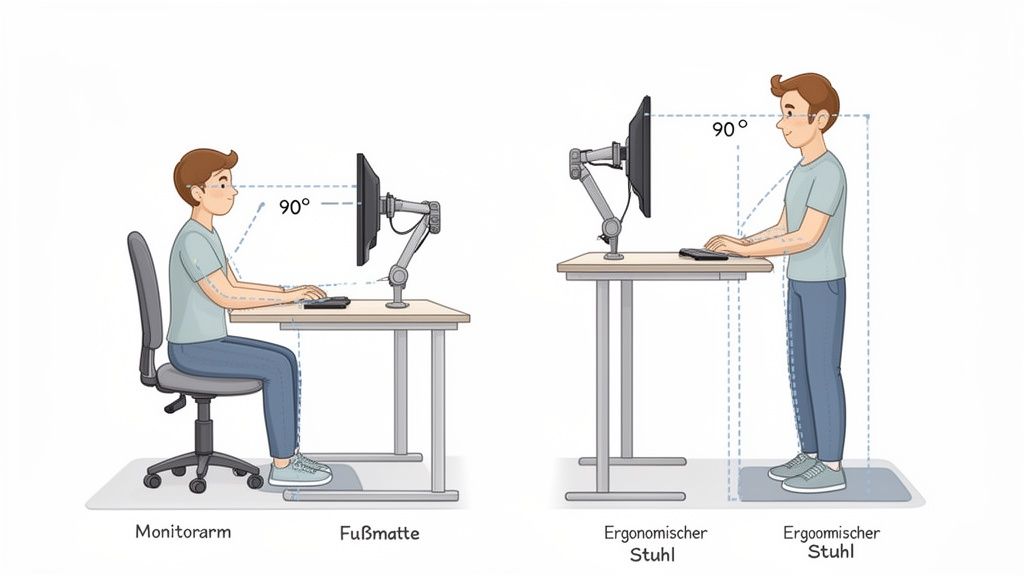
Bend your elbows at a 90-degree angle. Your forearms should be relaxed and parallel to the desk top.
Raise or lower the desk until the desk top gently touches your forearms from below.
Your hands are now resting loosely on the keyboard, without you having to bend your wrists. This position relieves your upper body.
The correct setting for standing
Even when standing, the 90-degree angle is crucial. Stand upright in front of your desk, feet about shoulder-width apart. Your shoulders remain relaxed.
Raise the desk top until your elbows again form a 90-degree angle and your forearms rest parallel to the top. Avoid leaning on the desk. This impairs a neutral posture.
Pro-Tip: Save your optimal sitting and standing heights in the memory function of your sit-stand desk. This way, you can switch precisely between the ergonomically correct positions at the touch of a button.
Guidelines for desk height at different body sizes
The following table serves as a starting point for finding your personal desk height. Consider the values as a guide and adjust the last few centimeters according to your body sensation.
Body Height
Recommended Sitting Height (Desk)
Recommended Standing Height (Desk)
160 cm
64 – 66 cm
98 – 100 cm
170 cm
68 – 70 cm
104 – 106 cm
180 cm
72 – 74 cm
110 – 112 cm
190 cm
76 – 78 cm
116 – 118 cm
200 cm
80 – 82 cm
122 – 124 cm
Your individual perception counts more than a rigid number. Use the table as a starting point and find the setting that feels best for you.
Ergonomic accessories for your workstation
A perfectly adjusted desk is the foundation. With sensible accessories, you can further optimize your workstation.
Monitor arms: They allow you to position the screen exactly at the right height and distance. The top edge of the monitor should be at or slightly below your eye level.
Ergonomic chairs: A good office chair supports your lumbar spine and promotes dynamic sitting by adapting to your movements.
Anti-fatigue mats: They cushion the hard floor, stimulate minimal movements in the leg muscles, and improve blood circulation. This allows you to stand longer and more comfortably.
The combination of a correctly adjusted desk and suitable accessories creates a work environment where you feel comfortable and productive.
What to look for when buying a sit-stand desk
The market for sit-stand desks is vast. A good decision considers more than just price and design. True quality features are often invisible: independent certifications, a long warranty, and good service.
These points show whether a manufacturer stands behind its product. They are key to finding a desk that will reliably accompany you through your workday.
Independent certifications as a mark of quality
Certificates from independent testing institutes are objective proof of quality. They confirm that a desk meets strict requirements for safety and ergonomics. Two seals are particularly relevant:
TÜV certification: A seal like that from "TÜV Rheinland" confirms that the desk has been tested for stability, load capacity, and electrical safety.
IGR certification: The "Institute for Health and Ergonomics" (IGR) checks whether a product is back-friendly. An IGR-certified desk demonstrably supports a healthy posture.
With these seals, you invest in your health and safety.
Warranty as an indicator of longevity
The warranty period is a statement from the manufacturer. It shows how much they trust their own technology, especially the motors and electronics.
A warranty of only two years can be an indication of cheaper components. A long warranty of up to 10 years signals high-quality, robust motors and reliable electronics for long-term use.
A long warranty not only protects your investment. It is a commitment from the manufacturer to the quality and reliability of the technology used.
The demand for high-quality solutions is great. Approximately 45% of German employees want ergonomic furniture for their home office. Studies show that sit-stand desks can reduce back pain from 80% to 51.7% and increase productivity by up to 46%. You can find more figures on this in the insights from Global Growth Insights.
Services that make the difference
A good product also requires good service. When searching, pay attention to these points:
Service
Why it's important
Long test phase
A test phase of 100 days gives you the freedom to try out the desk in everyday life. This way, you can determine if it suits your working style.
Free delivery & returns
Free shipping and uncomplicated, free returns eliminate your risk.
Fast shipping
Fast delivery within 1-3 days means you can use your new workstation immediately.
Assembly service
An optional assembly service allows for stress-free and professional setup of the desk.
If you consider these three areas – certifications, warranty, and service – you will find a sit-stand desk where the entire package is convincing.
Frequently asked questions about sit-stand desks
Are you considering purchasing a height-adjustable desk but still have questions? Here we answer the most common concerns briefly and directly.
We clarify how often you should switch between sitting and standing and what such a desk will cost on your electricity bill. This way, you are well-prepared for your decision.
How often should I switch between sitting and standing?
The secret lies in regular alternation, not in standing for hours. Those who stand all day put as much one-sided strain on their body as those who only sit.
As a rule of thumb, the 40-15-5 principle has been established for every working hour. It is easy to implement and keeps you moving.
40 minutes sitting: Ideal for tasks that require full concentration.
15 minutes standing: Use this time for dynamic activities such as emails or phone calls.
5 minutes moving: Stand up, get water, or stretch. This break boosts circulation.
This rhythm keeps your body active and prevents tension without affecting your productivity.
What is the power consumption of a sit-stand desk?
The power consumption of an electrically height-adjustable desk is low. The motors only need energy when you adjust the height. That's only a few seconds per day.
In standby mode, consumption is negligible. For high-quality models, it is usually less than 0.5 watts.
Calculated annually, electricity costs are in the low single-digit Euro range. A sit-stand desk is not a burden on your electricity budget.
Can I retrofit my old desk frame?
Keeping the old desk top and only installing a new, height-adjustable frame is possible. However, it often has disadvantages.
The biggest problem is fit and stability. You need to ensure that your top matches the new frame. A good frame alone is often hardly cheaper than a complete, coordinated desk.
A complete system has clear advantages:
Guaranteed stability: Top and frame are tested as a unit.
Easy assembly: All parts are guaranteed to fit together.
Full warranty: You receive a comprehensive warranty on the entire system.
In most cases, buying a complete, certified sit-stand desk is the safer choice. This way, you invest in a stable and reliable system.
Ready to upgrade your workspace? Discover Deskspace's TÜV and IGR-certified models and find the perfect desk for your needs. Benefit from a 100-day trial period and up to 10 years warranty.